TROUBLESHOOTING · UPDATED OCTOBER 2026
Car Parking Multiplayer Not Working? Fix Common Issues
Install errors, lag, overheating and crashes, with fixes that are quick to try
Most CPM problems come down to a handful of causes: a leftover old install, a broken download, a weak connection or a hot phone. This guide goes through each error with the fix to try first. Lag only? Jump to the lag fix guide.
Uninstall old copy firstUse stable WiFiLower graphicsBack up before reinstalling
3
Install Errors
3
Performance Fixes
3
Mod-Specific Issues
1
Fresh Install Fixes Most
When the game refuses to install or run, the cause is usually simple. Work through the section that matches your problem, one fix at a time, and restart the game between attempts.
Before you start: menu names differ between phone brands and Android versions. The steps below are the usual path, so look for the closest match on your device. Back up anything you care about first, since some fixes remove local data.
Installation Failures
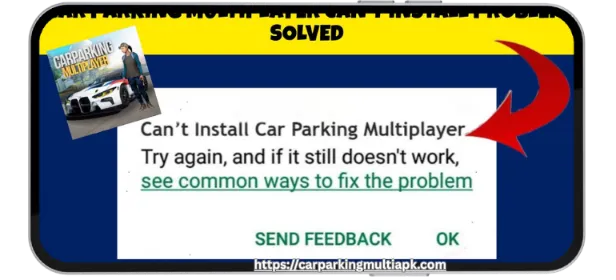
“App not installed” error
This often means a conflicting installation already exists.
- Uninstall every version of Car Parking Multiplayer completely.
- Restart your phone.
- Clear the Play Store cache.
- Install the APK again.
- Still failing? Allow “install unknown apps” for the file manager you open the APK from, not only your browser.
Not sure which build to use? See the older versions page or the Android download guide.
“Parse error”
Usually a damaged or incomplete download. Delete the APK, clear your browser cache and download it again on stable WiFi. Mobile data sometimes cuts a download short even when the file looks complete. Also check that the APK matches your Android version.
Samsung phones blocking the install
Some Samsung phones add extra security checks. Open Settings, find the install unknown apps option (often under Biometrics and security or Apps), and enable it for your file manager. Developer Options and USB debugging are not required for a normal install.
Performance Issues
Stuttering in multiplayer
Stutter online is usually the connection, not the phone. A steady connection matters more than a fast one, and high ping makes other cars jump or lag. As a rough guide, many players aim for a few Mbps and a low, stable ping. Switch between WiFi and mobile data to see which behaves better, and move closer to the router.
Frame drops in the garage
The garage can be one of the heavier scenes. Set graphics to medium, turn off real-time reflections and disable motion blur. You keep good visuals on the road while the garage runs smoother. More options in the graphics settings guide.
Overheating after about 30 minutes
Hot phones slow themselves down to cool off. Try battery saver mode, which can reduce background load, and take the case off. Play in a cooler spot, and avoid playing while charging if heat is the problem, since charging adds more.
Mod-Specific Issues
Modified APKs behave differently from the Play Store version, and results depend on the build and where you got it. A few common situations:
Features not showing
Features may differ between builds, and some may not work in online modes. Check the instructions on the page you downloaded from, and confirm the version number matches.
Cars still locked
Some builds unlock cars through a menu instead of automatically. Look in the game’s own menus and read the download page’s steps. Don’t trust sites that ask for logins or payment.
Crash at startup
Clear app data and cache first. If it still crashes, uninstall completely, restart the phone and install fresh. You may lose local progress, so back up first.
Modded files carry real risks, including account bans and unsafe downloads. Read the APK vs MOD guide before installing anything, and only download from sources you trust.
The Order to Try Fixes In
Start with the lightest fix and move down the list. Most problems clear before you reach the reinstall step.
Frequently Asked Questions
Final Thoughts
Start light, change one thing at a time and keep a backup. Most of the time a clean reinstall or a better connection is all it takes to get back on the road.
If you are still stuck, see the troubleshooting hub, the lag fix guide and the update history to check whether a recent version changed something. Official game: Google Play listing.
Which fix solved your problem? Tell us in the comments.
Want more guides like this? Browse our latest guides.