I con,t solved Common Issues after six months of helping friends install and run the mod, which taught me every failure point. Here’s how to solve problems preventing smooth gameplay.
Installation Failures
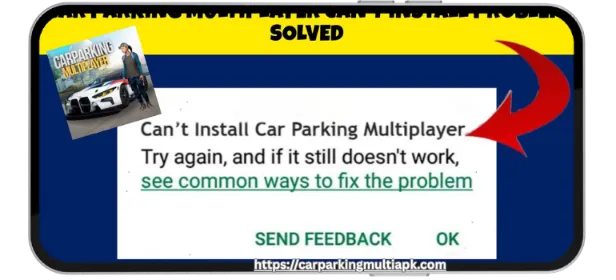
“App not installed” error: Usually means a conflicting existing installation. Uninstall any version of Car Parking Multiplayer completely. Restart the device. Clear Play Store cache. Then install the mod APK. If the error persists, enable “install unknown apps” specifically for your file manager app, not just Chrome or browser.
“Parse error”: Indicates corrupted download. Delete the APK file completely. Clear browser cache. Re-download using a stable WiFi connection. Mobile data occasionally causes incomplete downloads that look complete.
Samsung Secure Folder blocking: Samsung devices have additional security preventing modified APK installation. Go to Settings → Biometrics and Security → Install Unknown Apps. Enable your file manager. Some Samsung models require Developer Mode to be enabled. Go to Settings → About Phone. Tap Build Number seven times. This unlocks Developer Options, where you can enable USB debugging and additional install permissions.
Performance Common Issues
Stuttering during Car Parking multiplayer: Almost always network-related. Test internet speed. Minimum 5 Mbps download, 1 Mbps upload required for smooth multiplayer. Latency matters more than speed. Anything above 100ms creates position desync. Switch from WiFi to mobile data or vice versa to test which connection performs better.
Frame drops in the garage: The garage contains the highest polygon count scenes in the game. Lower graphics to medium. Disable real-time reflections. Turn off motion blur. These settings impact the garage more than gameplay. You maintain visual quality where it matters while improving performance where it doesn’t.
Overheating after 30 minutes: Some devices throttle processor speed when hot, then face common issues. Enable battery saver mode. This sounds counterintuitive, but it often works. Battery saver limits background processes,s freeing resources for the game. Place the device near a fan or AC vent during extended sessions. Never play while charging if overheating is an issue; the additional heat from charging compounds the problem.
Mod-Specific Issues
Unlimited money not appearing: Some mod versions require the first launch while connected to the internet. The mod activates server-side. Launch the game, connect to the multiplayer lobby, then restart. Money should appear. If not, you downloaded a fake mod. Delete completely and source from verified providers.
Cars still locked despite mod claims: Certain mods unlock cars through a menu rather than automatically. Look for the “Mod Menu” button on the main screen. Some hide it in settings. Others require a specific gesture like a three-finger swipe. Check the source website for activation instructions.
Game crashing at startup: Clear app data and cache before launching. Some mods conflict with existing save files. If the crash persists, uninstall completely, including all data. Restart the device. Install mod fresh. You lose progress but gain stability.